Our user machines are deployed with Windows 7 64bit and IE 11 installed. I notice that when I go to sites that check the browser, the sites respond that "browsers less than version 8 are not supported" or words to that effect. Usually, the browser works fine and there are no issues. I have been trying to get Microsoft's EMET to work with this configuration since version 4.0; and I have not been successful. Internet Explorer crashes with EMET running.
I read that a new version, 5.1, might fix this. After setting up EMET, and tweaking it to my environment, I checked Internet Explorer, and it still crashes. Are there fixes or workarounds for this issue?
Showing posts with label Tools. Show all posts
Showing posts with label Tools. Show all posts
Thursday, December 4, 2014


Monday, May 12, 2014
SANS SIFT 3 and the Desktop Share
I had the new SIFT 3.0 downloaded for a while, but I haven't been using it as much as I would like. I've been using the older 2.x version. One of the main reasons is that on the 2.x version of SIFT, there was a desktop shortcut that took me directly to a directory of the host OS. This is missing in the 3.0 version of SIFT. I fully admit, I don't know linux as well as I know Windows.
Quickly reading up on the issue, and I found that this mount to the guest OS should be found in mount_points/hgfs. I had that directory, but nothing was populated there. And, in the Virtual Machine Settings, I had the Shared Folders set to Always Enabled. Still nothing.
On a reboot, I noticed that there was an update to VMWare Player. I updated, and checked the mountpoints directory, but still nothing. One last google suggested running vmware-config-tools.pl.
Sure enough, after answering the questions, that did the trick. Now, in the mout_points/hgfs folder, I see a subfolder for "C". Bingo.
Now I have to get used to Unity and finding what I used to be able to find in SANS SIFT 2.x.
If anyone else has tips on making that transition, feel free to leave advice in the comments.
Quickly reading up on the issue, and I found that this mount to the guest OS should be found in mount_points/hgfs. I had that directory, but nothing was populated there. And, in the Virtual Machine Settings, I had the Shared Folders set to Always Enabled. Still nothing.
On a reboot, I noticed that there was an update to VMWare Player. I updated, and checked the mountpoints directory, but still nothing. One last google suggested running vmware-config-tools.pl.
Sure enough, after answering the questions, that did the trick. Now, in the mout_points/hgfs folder, I see a subfolder for "C". Bingo.
Now I have to get used to Unity and finding what I used to be able to find in SANS SIFT 2.x.
If anyone else has tips on making that transition, feel free to leave advice in the comments.
Monday, February 10, 2014
Too Much Zeus, Need Recommendations
It's been a little over three months since I have started the new job. To be certain, I love it. I'm really starting to get my arms around all that goes on (or doesn't) around here. And while I know I have a daunting task to help guide this place towards becoming more secure; I know I have already taken great strides in moving forward.
I fully admit that there are some pretty basic controls that are not implemented. If I were an auditor from my previous contracting job, my head would probably explode with some of the findings here. Some of them are THAT basic. But, these decisions have been made way in the past, and for the most part fall into the politics/culture category. It will take a while to get movement on those controls. Or a decent-sized breach.
All of that said, I was looking through my incident notes for the past month (or so.) And looking at the fires I put out on a daily basis, I see that I work to eradicate at least one Zeus-infected host a day. That's an average. I've given up on remediating the hosts. I send the IP to our helpdesk and let them get it off the network and reimaged.
In light of the controls that need grassroots work, I'm looking for a solution that I can dump on the client hosts to help combat zero-days, attachments, etc.
One recommendation I have received so far is Invincea.
Are there any potential solutions I should be aware of?
I fully admit that there are some pretty basic controls that are not implemented. If I were an auditor from my previous contracting job, my head would probably explode with some of the findings here. Some of them are THAT basic. But, these decisions have been made way in the past, and for the most part fall into the politics/culture category. It will take a while to get movement on those controls. Or a decent-sized breach.
All of that said, I was looking through my incident notes for the past month (or so.) And looking at the fires I put out on a daily basis, I see that I work to eradicate at least one Zeus-infected host a day. That's an average. I've given up on remediating the hosts. I send the IP to our helpdesk and let them get it off the network and reimaged.
In light of the controls that need grassroots work, I'm looking for a solution that I can dump on the client hosts to help combat zero-days, attachments, etc.
One recommendation I have received so far is Invincea.
Are there any potential solutions I should be aware of?
Thursday, January 24, 2013
DumpEventLog is a great tool to parse Windows event logs
We have an instant messaging server in the office which helps with communication with those employees that telecomute. The server is running OpenFire (I think) and the clients are using Pidgin to connect and instant message. I'm not much of an administrator, so I can not comment on how good the tools actually are. But, as a user, I find great value in being able to reach out to anyone and have a quick conversation without having to wait for email or the like.
That said, our Pidgin server has been going down with some regularity; roughly once a month, but sometimes a bit more. And when it goes down, it takes forever to come back up. The usefulness as a tool has been diminishing.
As an incident response guy, one of the first things I wanted to see was the logs. But, I did not know a way that I would be able to read the logs short of logging in to the server...and I did not have credentials (I'm not an admin.) I looked for, and found, this script, DumpEvenLogs.vbs. The script was suitable for me to give to an admin to run and provide the results back to me. And, there were a couple of canned scripts to look at some of the low hanging fruit (failed logons, user accounts created, abnormal shutdowns, etc.) The data returned to me was easy enough to read, and in a format that I could look at whatever criteria I wanted. Ultimately, I filtered the data on date, and was able to pin down that the machine was hanging upon reboots after applying patches. Rather benign. But, having this tool helped solve the problem. As for the server issue.....that hasn't been fixed, but at least we know when to expect it to go down again next.
That said, our Pidgin server has been going down with some regularity; roughly once a month, but sometimes a bit more. And when it goes down, it takes forever to come back up. The usefulness as a tool has been diminishing.
As an incident response guy, one of the first things I wanted to see was the logs. But, I did not know a way that I would be able to read the logs short of logging in to the server...and I did not have credentials (I'm not an admin.) I looked for, and found, this script, DumpEvenLogs.vbs. The script was suitable for me to give to an admin to run and provide the results back to me. And, there were a couple of canned scripts to look at some of the low hanging fruit (failed logons, user accounts created, abnormal shutdowns, etc.) The data returned to me was easy enough to read, and in a format that I could look at whatever criteria I wanted. Ultimately, I filtered the data on date, and was able to pin down that the machine was hanging upon reboots after applying patches. Rather benign. But, having this tool helped solve the problem. As for the server issue.....that hasn't been fixed, but at least we know when to expect it to go down again next.
Tuesday, December 4, 2012
Searching for malware with Sysinternals tools
This is mostly a placeholder post so I know where to find this great video lecture.
Those of you that are constantly fighting malware may want to take a gander at this lecture as Mark's awesome tools are featured.
Those of you that are constantly fighting malware may want to take a gander at this lecture as Mark's awesome tools are featured.
Friday, March 23, 2012
DISA auditing of a SQL 2005 Express database
On my upcoming trip, I have to audit a SQL 2005 Express database and hold it accountable to the DISA SQL Server 2005 checklist. I know that there are parts of the checklist that will be "Not Applicable" as Express just doesn't have all of the features that Server has. My plan is to run the Microsoft SQL Server SRRs against the database, then connect and check as many of the manual checks as possible.
To connect to the database, I plan on use OSQL. In this case, my command will be:
osql -E - which will connect me to the database (assuming that it is the default.)
osql -E -S\instance name - I'll use this if they have changed the instance name.
Upon connecting, I should be able to run any of the manual sql that is listed in the checklist in order to answer the controls.
(In an unclassified environment, I would bring along QueryExpress.exe and connect to the database that way to run queries.)
To connect to the database, I plan on use OSQL. In this case, my command will be:
osql -E - which will connect me to the database (assuming that it is the default.)
osql -E -S
Upon connecting, I should be able to run any of the manual sql that is listed in the checklist in order to answer the controls.
(In an unclassified environment, I would bring along QueryExpress.exe and connect to the database that way to run queries.)
Thursday, February 23, 2012
Is Firefoxforensics.com down? Missing? Replaced? Upgraded?
An anonymous commenter on this post mentioned that Firefoxforensics.com was down. I've checked over the last couple of days, and the site can not be found by various browsers. Whois says the domain is still good. Has anyone heard if it is down for good? Or, since Firefox is up to version 10, are there new tools replacing F3E? I may have missed an announcement, if so, feel free to clue me in.
Thursday, February 9, 2012
Ovaldi error message: missing MSVCP100.dll
I downloaded the new version of Ovaldi.exe the other day, version 5.10.1.1. After ensuring that I had the correct definition file, I kicked off a scan on a Windows 7 machine. Rather quickly, I received the following error message:

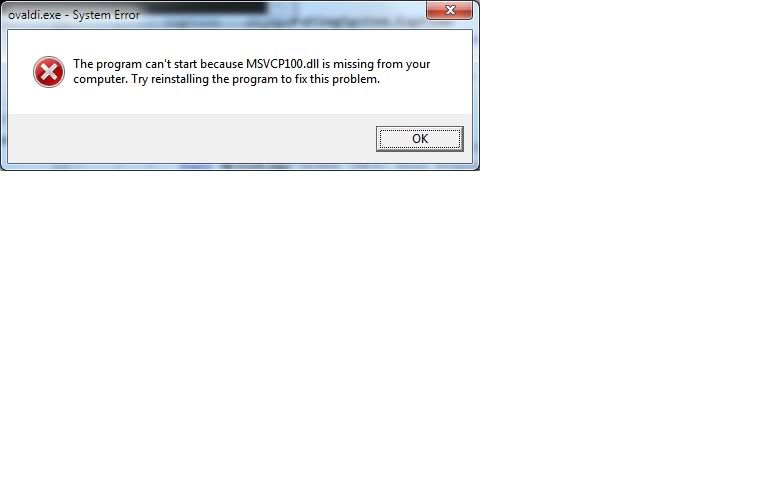
I would love to hear any ideas to solve this. I don't see the DLL in the zipped up package, and I don't know if this is a DLL typical to Windows 7 machines. Googling the DLL did not yield any obvious solutions. For the time being, I rolled back to the 5.9.1 schema, but I would like to use a newer version.
February DISA and Mitre updates
I received an email the other day that DISA has released a draft of the Internet Explorer 9 STIG. Comments need to be submitted by 21 February.
Further, while updating my Oval definitions today, I noticed two definition files I had not seen before: XP Media Center Edition and XP Tablet PC edition. They might have been there a while, but it is the first time I have seen them. (And in reality, I have not come across those editions in the DoD world, yet.)
Further, while updating my Oval definitions today, I noticed two definition files I had not seen before: XP Media Center Edition and XP Tablet PC edition. They might have been there a while, but it is the first time I have seen them. (And in reality, I have not come across those editions in the DoD world, yet.)
Thursday, January 5, 2012
Tr3Secure Data Collection script
The other day, I saw a post on Corey's blog (Journey Into Incident Response) that was really cool. He released a script that quickly grabs volatile information from a possibly compromised machine. His post documents the why's, the tools, and the framework of the tool; so I'll let you read the post rather than summarize.
What I'll add is that this script does a lot of great things. I pulled down the dependencies and started testing the script out on some of our test laptops. The laptops that I've used have been a mix of Windows XP and Windows 7 machines with various amounts of RAM. The script has run quickly, and efficiently formats the output for analysis after the fact. Some of the tools I was familiar with, and there were some new tools there that I will give further study to.
I will be using this script (as I get more familiar with it) on machines that I receive when collection of volatile data is paramount. Further, after learning some new tools, I will be incorporating some of the methodologies into DoD auditing. Certainly, I see the potential to replace some of the WMI calls I use when grabbing information from machines we are auditing due to improved output.
Another plus I see in the usage of this script is that the script runs from a .bat file. Most of my scripts have made heavy use of cscript/wscript; and I've found that cscript/wscript is not installed on all machines. Batch files tend to run on all machines.
What I'll add is that this script does a lot of great things. I pulled down the dependencies and started testing the script out on some of our test laptops. The laptops that I've used have been a mix of Windows XP and Windows 7 machines with various amounts of RAM. The script has run quickly, and efficiently formats the output for analysis after the fact. Some of the tools I was familiar with, and there were some new tools there that I will give further study to.
I will be using this script (as I get more familiar with it) on machines that I receive when collection of volatile data is paramount. Further, after learning some new tools, I will be incorporating some of the methodologies into DoD auditing. Certainly, I see the potential to replace some of the WMI calls I use when grabbing information from machines we are auditing due to improved output.
Another plus I see in the usage of this script is that the script runs from a .bat file. Most of my scripts have made heavy use of cscript/wscript; and I've found that cscript/wscript is not installed on all machines. Batch files tend to run on all machines.
Thursday, December 8, 2011
SUPER Timeline creation (from SANS)
I'm making a push for more forensics at work. One avenue I'm trying to open up is the investigation of laptops/computers of former employees. And, to that end, one of the tools I'll be making heavy use of is the timeline. I'm pretty adept at creating timelines with SIFT, but Log2Timeline was not in existence when I took my GCIH.
This article is an excellent primer on using Log2Timeline to create a SUPER timeline in SIFT, using many inputs from an acquired image.
(Edit 1/20/12) Rob Lee has added another article on Log2Timeline to the SANS Forensics blog, this article talking about log2timeline and log2timeline-sift. Plus, there are some good examples at the end of the article.
(Edit 1/28/12) Rob has added yet another article...releasing a template that colorizes output from Log2Timeline. I haven't given this a whirl, but I will after I create my next timeline.
Older articles:
How to Create a Filesystem and Registry Timeline
I've created this post so I know where to reference the original article, as I'm sure I'll forget.
This article is an excellent primer on using Log2Timeline to create a SUPER timeline in SIFT, using many inputs from an acquired image.
(Edit 1/20/12) Rob Lee has added another article on Log2Timeline to the SANS Forensics blog, this article talking about log2timeline and log2timeline-sift. Plus, there are some good examples at the end of the article.
(Edit 1/28/12) Rob has added yet another article...releasing a template that colorizes output from Log2Timeline. I haven't given this a whirl, but I will after I create my next timeline.
Older articles:
How to Create a Filesystem and Registry Timeline
I've created this post so I know where to reference the original article, as I'm sure I'll forget.
Monday, August 29, 2011
Retina and Auditing File Versions
I have a quick Retina question for anyone that uses Retina with any regularity. While testing this past week, I came across an issue with Retina.
After point Retina at its targets, it would launch and run the scan with no problems; until it reached the Auditing File Versions check. Then, the scan would crawl almost to a halt. A couple of times, I had to check Task Manager to make sure that Retina was still running.
Has anyone else run into this?
After point Retina at its targets, it would launch and run the scan with no problems; until it reached the Auditing File Versions check. Then, the scan would crawl almost to a halt. A couple of times, I had to check Task Manager to make sure that Retina was still running.
Has anyone else run into this?
Thursday, June 16, 2011
Using a .audit file with Nessus to scan a host
I've created this post because I couldn't find detailed directions. Here's what took me down this path. Auditing Windows 7 machines is a laborious task; there is no easy way to do it without sitting down with the DISA checklist and going through each check one by one. As we move to SCAP-based tools, we should be able automate this; either by using OVAL and an XCCDf file, or using Retina and the XCCDF wizard. I've started playing around with both of those methods, and I'm not 100% there yet. I get them to run, but the results are not exactly what I expect.
One of my co-workers asked me about i2a, a utility put out by Tennable that converts .inf files to .audit files to use with Nessus. (By the way, as I understand it, i2a only works with the professional version. Audit files work with both the professional and free versions.) If you look in the Windows 7 STIG, the templates folder contains .inf files.
I copied the .inf file to the directory containing i2a. My command to create an .audit file was:
This ran, and there were a few errors in the log file. I believe that Nessus can not perform some of the checks in the .inf file, so they are flagged.
Next, I opened up Nessus. Then, I created a new Policy: Click on Policy, Add.
I gave my scan a name, Win7, checked my options, added my credentials, checked my plugins, then clicked on preferences. Under preferences, I picked the Windows Compliance checks. Then, I browsed for my Win7.audit file and added it as Policy File #1.
After this, it was as simple as setting up a new scan and using the policy I just created. I'm going to start looking at the results to see how good a job Nessus does, and what needs to still be looked at manually.
One of my co-workers asked me about i2a, a utility put out by Tennable that converts .inf files to .audit files to use with Nessus. (By the way, as I understand it, i2a only works with the professional version. Audit files work with both the professional and free versions.) If you look in the Windows 7 STIG, the templates folder contains .inf files.
I copied the .inf file to the directory containing i2a. My command to create an .audit file was:
i2a-2.0.4 U_FSO_Win7_Analyze_only_V1R4.inf Win7.audit
This ran, and there were a few errors in the log file. I believe that Nessus can not perform some of the checks in the .inf file, so they are flagged.
Next, I opened up Nessus. Then, I created a new Policy: Click on Policy, Add.
I gave my scan a name, Win7, checked my options, added my credentials, checked my plugins, then clicked on preferences. Under preferences, I picked the Windows Compliance checks. Then, I browsed for my Win7.audit file and added it as Policy File #1.
After this, it was as simple as setting up a new scan and using the policy I just created. I'm going to start looking at the results to see how good a job Nessus does, and what needs to still be looked at manually.
Friday, November 19, 2010
Open Source Forensics
This is more a mental note than anything else. I wrote down the address the other day, but when I looked through my news feed, I couldn't find where I saw the original announcement. Anyway, a resource for open source forensics has been developed.
http://www2.opensourceforensics.org
I will probably compose a post on my "essential" tools at some point.
http://www2.opensourceforensics.org
I will probably compose a post on my "essential" tools at some point.
Thursday, October 28, 2010
Ovaldi initialize error
When auditing systems that run a Microsoft operating system, I use Ovaldi to find patch management issues. (I understand it will run on *nix-based systems, but I've never tried it.) I have it scripted out in a large script that performs other host-based scanning and configuration gathering. Very occasionally, I'll see in my results directory that Oval did not run for a particular server. (Typically, it is servers where I find missing results. Rarely, I see the problem on workstations.)
Today, I was looking through Oval documentation when I came across the following at
http://sourceforge.net/apps/mediawiki/ovaldi/index.php?title=Installation:
As a third-party auditor, I do not add the VC++ redistributable package as I do not want to introduce potentially new vulnerabilities to the system. And, I do not want to break anything else.
Today, I was looking through Oval documentation when I came across the following at
http://sourceforge.net/apps/mediawiki/ovaldi/index.php?title=Installation:
Also, on some Windows systems, the OVAL Interpreter may fail with the following error message when executed.
“The application failed to initialize properly (0xc0150002). Click OK to terminate the application.”
This error message occurs when the run-time components of Visual Studio, that are required to run an application developed with Visual Studio, are not installed. If you receive this error message while executing the OVAL Interpreter, please install the VC++ redistributable package that can be obtained at the following link.
http://www.microsoft.com/downloads/details.aspx?familyid=A5C84275-3B97-4AB7-A40D-3802B2AF5FC2&displaylang=en
The VC++ redistributable package will install the required run-time components.
As a third-party auditor, I do not add the VC++ redistributable package as I do not want to introduce potentially new vulnerabilities to the system. And, I do not want to break anything else.
Friday, August 13, 2010
Vulnerable Web Applications for testing and practice
I'm working on a small presentation for web application testing. In order to get the bullet points across, I want to have an application where the students can actually try the attacks and see the results as I find that this gets the points across more effectively than PowerPoint slides. Knowing only a handful of the more popular applications, I started searching. Google gave me more than I could imagine, and I'm listing a bunch of them here.
This first group are actual applications to be installed:
Vincum
OWASP WebGoat
OWASP Insecure Web App Project
Damn Vulnerable Web App
Hacme Travel
Hacme Bank
Hacme Shipping
Hacme Casino
Hacme Books
Mutillade
The Butterfly Project
Stanford SecuriBench
BadStore
Gruyere
WackoPicko
BodgeIt Store
Live sites (hosted on the internet):
SPI Dynamics
Cenzic
Watchfire
Acunetix (php)
Acunetix (asp)
NT Objectives
If I have missed a good one, please let me know. I haven't picked one yet, I'm still evaluating. But I'll add to the list as I hear of and try more applications.
edit: 4-19-2011 added BodgeIt Store
This first group are actual applications to be installed:
Vincum
OWASP WebGoat
OWASP Insecure Web App Project
Damn Vulnerable Web App
Hacme Travel
Hacme Bank
Hacme Shipping
Hacme Casino
Hacme Books
Mutillade
The Butterfly Project
Stanford SecuriBench
BadStore
Gruyere
WackoPicko
BodgeIt Store
Live sites (hosted on the internet):
SPI Dynamics
Cenzic
Watchfire
Acunetix (php)
Acunetix (asp)
NT Objectives
If I have missed a good one, please let me know. I haven't picked one yet, I'm still evaluating. But I'll add to the list as I hear of and try more applications.
edit: 4-19-2011 added BodgeIt Store
Tuesday, August 10, 2010
Free Monitoring Tools for Systems and Networks
The SANS Internet Storm Center has a great post today, that I'm linking to in order to come back to it as there are some great monitoring tools (free or inexpensive) for various operating systems.
Monitoring Tools
As there are a lot of posts at the Storm Center, I'm sure I'll lose this one if I don't create a link to it. Hopefully it will help out someone else.
Monitoring Tools
As there are a lot of posts at the Storm Center, I'm sure I'll lose this one if I don't create a link to it. Hopefully it will help out someone else.
Saturday, March 13, 2010
Peach Fuzz training
This past week I received two days of Peach Fuzz training by the author Michael Eddington. This is a great fuzzing tool that is extremely powerful, yet extremely extensible and flexible. Michael did a great job in teaching the class; it probably helps that he's the author of the program. For those of you doing pen testing or research into application bugs, this program is for you. We used it in class to find (known) bugs in a few applications. But the possibilities are endless.
However, as an DoD auditor, I just don't see the use. I won't have time while on a client site to get this up and running as there is so much more for me to do on site. We are usually cramped for time with many different technologies and platforms to test. And really, contractually, I don't believe we are authorized to pen-test. We run web application scanners, but we can not exploit the vulnerabilities we find.
Awesome tool, though. And I'm glad I was given the opportunity to attend the class.
However, as an DoD auditor, I just don't see the use. I won't have time while on a client site to get this up and running as there is so much more for me to do on site. We are usually cramped for time with many different technologies and platforms to test. And really, contractually, I don't believe we are authorized to pen-test. We run web application scanners, but we can not exploit the vulnerabilities we find.
Awesome tool, though. And I'm glad I was given the opportunity to attend the class.
Thursday, January 28, 2010
Mental Note on Firefox forensics using Firefox 3 Extractor
I left a post the other day on Firefox forensics, linking to Harlan's great page.
However, I wanted to dig a little further. I went to the Firefox 3 Forensics site and downloaded the Firefox 3 Extractor. It took a few minutes to get it right, but when I got it running, it was awesome; and a little eye opening.
First, I copied f3e.exe and sqlite3.dll into my firefox profile directory. I launched f3e, but couldn't get any results. Remembering my old sql developer days, it dawned on me that the files were locked as I had Firefox open. So, I closed Firefox and reran. Bingo. The internet history report came out. I tried to run another report, and the program failed with an error message.
So, this time, I followed the directions and copied the Firfox sqlite files to a seperate directory, and dumped f3e.exe and sqlite3.dll in there. Now, I could run any report, as many times as I like.
A couple of things I like:
The program asks for a case reference (maybe the profile of the subject)
The program asks for a cast name.
The program asks for the investigator.
With the internet history report option, you are asked if you want to use the favicons.
I chose the Internet History Usage report, which was D on my menu. After answering the questions, the html file is named "case refernce" - "case investigator" - Internet Usage.html so it is easy to find if you are running many reports.
Besides giving you the reference, name, and investigator, the report shows:
the top 20 most visited sites, with their counts, and,
A table with rows showing: favicon (if used), visit date, url, title, and if the url was typed.
I found it interesting going through the table that Yahoo mail uses the subject of the email as the title of the page. This could be useful if having to trace through web email.
I ran the other reports and have only skimmed the .csv files that have been produced. A quick look shows a detailed cookie analysis, a forms history file, a detailed bookmarks analysis, favorite icon analysis, and a couple of others that were blank (I might not be recording that information.)
There is a mini-FAQ, that lists where the various profile directories are stored.
Running the tool got me to consider the difference between "Private Browsing" and "Clearing Private Data". Normally, I clear my private data at the end of each session. But, I'm thinking of moving to Private Browsing, as it appears private browsing does not write the information to the hard drive.
So far, this is a great tool, that I plan to use in the future.
However, I wanted to dig a little further. I went to the Firefox 3 Forensics site and downloaded the Firefox 3 Extractor. It took a few minutes to get it right, but when I got it running, it was awesome; and a little eye opening.
First, I copied f3e.exe and sqlite3.dll into my firefox profile directory. I launched f3e, but couldn't get any results. Remembering my old sql developer days, it dawned on me that the files were locked as I had Firefox open. So, I closed Firefox and reran. Bingo. The internet history report came out. I tried to run another report, and the program failed with an error message.
So, this time, I followed the directions and copied the Firfox sqlite files to a seperate directory, and dumped f3e.exe and sqlite3.dll in there. Now, I could run any report, as many times as I like.
A couple of things I like:
The program asks for a case reference (maybe the profile of the subject)
The program asks for a cast name.
The program asks for the investigator.
With the internet history report option, you are asked if you want to use the favicons.
I chose the Internet History Usage report, which was D on my menu. After answering the questions, the html file is named "case refernce" - "case investigator" - Internet Usage.html so it is easy to find if you are running many reports.
Besides giving you the reference, name, and investigator, the report shows:
the top 20 most visited sites, with their counts, and,
A table with rows showing: favicon (if used), visit date, url, title, and if the url was typed.
I found it interesting going through the table that Yahoo mail uses the subject of the email as the title of the page. This could be useful if having to trace through web email.
I ran the other reports and have only skimmed the .csv files that have been produced. A quick look shows a detailed cookie analysis, a forms history file, a detailed bookmarks analysis, favorite icon analysis, and a couple of others that were blank (I might not be recording that information.)
There is a mini-FAQ, that lists where the various profile directories are stored.
Running the tool got me to consider the difference between "Private Browsing" and "Clearing Private Data". Normally, I clear my private data at the end of each session. But, I'm thinking of moving to Private Browsing, as it appears private browsing does not write the information to the hard drive.
So far, this is a great tool, that I plan to use in the future.
Friday, November 27, 2009
Microsoft Password Checker
I'm sure there are many password validators or checkers. However, I happened to be reading a pretty good article from Microsoft on their research into passwords when I noticed a link to their page that will evaluate a string to see how strong it would be as a password. Their password checker is located here. While the policies and recommendations that are made should be known in the security field, the page is good for clients (and those needing education) as a way to gauge how good their passwords are.
Subscribe to:
Posts (Atom)

